


TL;DR: Risk management automation
- Risk management automation replaces manual tracking with continuous, agent-driven workflows across controls, evidence, and remediation.
- Unlike traditional GRC software, it provides real-time risk visibility instead of relying on static spreadsheets and periodic reviews.
- Automation helps reduce evidence gaps, streamline audit preparation, and give teams faster insight into control issues and risk exposure.
- Cross-framework control mapping allows a single control to support multiple compliance requirements without duplicating work.
- Leading AI GRC platforms like Scytale combine automation, continuous monitoring, and expert GRC guidance to help organizations run more efficient risk management programs.
Manual risk programs often begin to fail long before the impact becomes visible. Control gaps go unnoticed, evidence becomes difficult to track, and audit preparation turns into a time-consuming scramble across disconnected systems. Risk management automation closes that gap by replacing reactive, manual processes with continuous, streamlined workflows.
In this article, we’ll explore what risk management automation is, how it works, the challenges of manual Governance, Risk, and Compliance (GRC) processes, and how platforms support continuous risk management
What is risk management automation?
Risk management automation helps organizations manage risk through continuous, automated workflows instead of manual reviews, spreadsheets, and static trackers. Rather than relying on periodic assessments or scrambling before audits, teams can continuously monitor controls, collect evidence, identify gaps, and move remediation forward in real time.
This differs from traditional GRC software, which often serves mainly as a centralized system of record. Automated risk management platforms act as an operational layer that connects business systems, monitors control activity, flags issues as they arise, and supports ongoing risk assessment workflows across cloud environments, applications, and infrastructure. The goal is not simply to digitize compliance tasks, but to create continuous visibility into risk and control performance.
The move from periodic reviews to continuous monitoring changes how organizations manage exposure and maintain audit readiness. Instead of discovering problems during annual reviews, teams gain ongoing insight into control effectiveness, evidence status, and remediation progress. According to IBM, organizations using security AI and automation reported breach costs that were approximately $1.9 million lower on average, underscoring the importance of continuous risk monitoring within modern GRC programs.
💡For a broader overview of risk management, controls, and compliance, have a look at our Ultimate Guide to GRC Compliance.
Streamline GRC workflows with no blind spots.
Why manual risk management falls short
As organizations grow, manual risk management processes become harder to maintain efficiently and consistently. Here are some of the main reasons why manual approaches often create operational and compliance challenges over time:
Evidence gaps
Manual risk management processes often rely on spreadsheets, screenshots, email reminders, and disconnected systems. As environments change, teams quickly lose visibility into whether controls are operating consistently. Evidence is frequently collected only when an audit or assessment approaches, making it difficult to verify whether a control worked continuously or only at the moment a report was generated.
Audit delays
Manual programs create significant operational overhead across security, IT, HR, and engineering teams. Audit preparation often involves repeated follow-ups, duplicate evidence requests, and time-consuming coordination between departments. This slows remediation efforts, increases audit preparation time, and creates inconsistencies in documentation.
Alert fatigue
Many organizations receive large volumes of alerts from multiple security and GRC tools without a centralized workflow for prioritization and ownership. Teams spend time manually reviewing low-priority notifications while higher-risk issues may be overlooked or delayed, reducing the effectiveness of risk response efforts.
Inability to scale across multiple frameworks
As organizations adopt additional frameworks and regulatory requirements, manual risk management becomes increasingly difficult to maintain. Teams often repeat the same reviews, evidence collection, and control checks across multiple frameworks, creating duplicate work and increasing the likelihood of gaps, inconsistencies, and missed requirements.
The hidden cost of manual GRC processes
The largest cost of manual GRC processes is often not the software itself, but the operational time required to maintain continuous compliance activities. Security, IT, and compliance teams spend significant time collecting screenshots, exporting logs, updating spreadsheets, reconciling evidence, and coordinating requests across disconnected systems.
These inefficiencies become more visible during audit preparation. Missing or incomplete evidence often leads to repeated follow-ups, duplicate requests, and rework between auditors, control owners, and compliance teams. A single missing report or incorrect date range can restart the evidence collection process and delay audit timelines.
Manual processes also create delays between when a control issue occurs and when it is identified. Without continuous monitoring, teams may discover failures weeks or months later, making remediation more difficult and reducing visibility into current risk exposure. These gaps often become visible in core GRC metrics, including remediation cycle time, exception backlog, evidence collection time, and overall audit readiness. As organizations scale across additional frameworks and systems, manual processes become difficult to sustain efficiently.
How risk management automation works
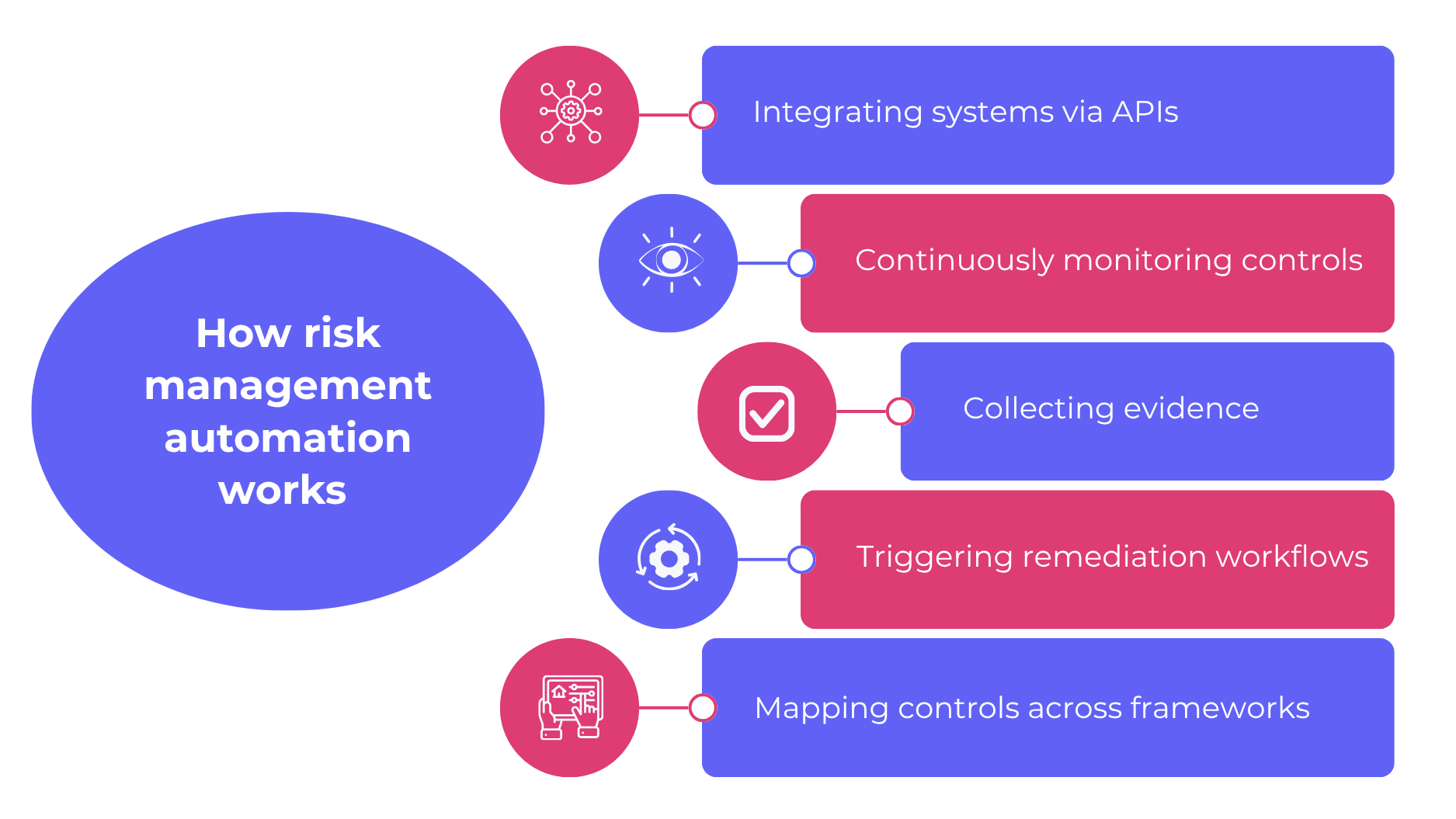
Risk management automation works by connecting directly to the systems that contain control, security, and operational data, then turning those inputs into continuous workflows. Instead of relying on periodic reviews, the platform continuously monitors controls, collects evidence, identifies gaps, and helps teams manage remediation activities in real time.
Integrating systems via APIs
The process begins with integrations across cloud infrastructure, identity providers, HR platforms, ticketing systems, and security tools. These API connections allow the platform to access the evidence and operational signals organizations already use to assess risk and compliance.
Continuously monitoring controls
Once systems are connected, the platform continuously evaluates controls against defined requirements and expected configurations. This replaces point-in-time assessments with ongoing visibility into control effectiveness, helping teams identify issues earlier and maintain a current view of risk exposure.
Collecting evidence and detecting gaps
As controls operate, the platform automatically gathers evidence and validates whether it supports mapped requirements. Automated workflows can identify missing evidence, outdated artifacts, configuration drift, or failed controls before they become larger audit or security issues.
Triggering remediation workflows
When a gap or control issue is detected, the platform can assign ownership, create follow-up tasks, and track remediation progress through resolution. This helps organizations move from passive reporting to active risk management and reduces the likelihood of unresolved issues remaining open between reviews.
Applying cross-framework control mapping
Cross-framework control mapping allows a single control to support multiple compliance standards simultaneously. Instead of repeating the same evidence collection and testing activities across different frameworks, teams can reuse controls and evidence across programs where requirements overlap. This becomes increasingly important as organizations expand into additional security, privacy, and AI governance frameworks over time.
Risk management automation across frameworks
Risk management automation delivers greater operational value when organizations manage multiple frameworks simultaneously. Without automation, each framework often introduces separate evidence requests, review cycles, control testing activities, and documentation requirements, even when many of the underlying controls overlap.
Cross-framework control mapping helps eliminate this duplication by linking a single operational control to multiple framework requirements. Teams can test a control once, collect evidence once, and reuse the results across applicable compliance programs, reducing manual effort and improving consistency across audits and assessments.
This approach is especially valuable as organizations grow and expand their compliance scope. Many companies begin with a single framework, then gradually add additional security, privacy, customer, AI policy and governance, or industry-specific requirements over time. As compliance complexity increases, centralized control management and evidence reuse become critical for maintaining scalability, visibility, and operational efficiency.
5 key benefits of automating risk management
Modern risk management platforms help organizations improve visibility, reduce manual effort, and manage compliance activities more efficiently. Here are some of the top benefits of automating risk management:
1. Always-on risk visibility
Continuous monitoring gives teams a live view of where controls hold and where they drift. That visibility helps risk owners act on current conditions instead of relying on outdated assessments.
2. Faster audit readiness
Evidence collection happens as controls operate, which reduces the scramble before an audit or customer review. Teams spend less time assembling proof and more time fixing the issues that matter.
3. Reduced manual workload
Automation removes repetitive admin work from compliance, security, and IT teams. That shift cuts follow-up cycles, lowers rework, and frees staff for higher-value analysis and remediation.
4. Executive reporting and decision support
Leaders need current reporting, not snapshots built from stale spreadsheets. Automated dashboards show risk posture, control health, and exception trends in a format executives use for planning and oversight.
5. Scalability as the business grows
As your business adds systems, teams, and frameworks, manual processes create bottlenecks. Enterprise risk management tools with automation support growth without multiplying headcount or duplicating control work.
AI-native GRC for how teams work today.
How to choose the right risk management automation platform
The right risk management automation platform should support your existing systems, workflows, compliance requirements, and broader risk management strategy. Here are some of the key areas to evaluate when comparing platforms.
Integration depth
Strong integrations allow the platform to automatically collect evidence and monitor controls across your environment. Review the number and type of native connectors available across cloud, identity, HR, ticketing, and security systems.
Framework coverage
Broad framework coverage helps teams avoid duplicate work across compliance programs. Look for platforms that support cross-framework control mapping and evidence reuse.
AI and agentic workflows
AI and agentic capabilities help automate evidence review, gap detection, and remediation workflows. This improves operational efficiency and supports a more scalable risk management strategy.
Implementation timeline
Implementation speed affects how quickly teams can operationalize the platform and begin reducing manual work. Evaluate onboarding requirements, internal resource needs, and expected time to value.
Support model
Ongoing support plays an important role in long-term execution and audit readiness. Consider whether the platform provides access to GRC experts, implementation guidance, and audit support.
Pricing transparency
Clear pricing helps organizations avoid unexpected costs as compliance scope expands. Review packaging details, included capabilities, and expansion pricing carefully.
What to look for in a risk management automation platform
| Platform capability | Why it matters | What to evaluate |
| Integration depth | Supports automated evidence collection and continuous control visibility | Number and type of native connectors across cloud, identity, HR, ticketing, and security systems |
| Framework coverage | Reduces duplicate work across compliance programs | Supported frameworks, cross-framework mapping capabilities, and evidence reuse |
| AI and agentic workflows | Improves operational efficiency and supports scalable risk management | Automated gap detection, evidence review, remediation routing, and workflow automation |
| Implementation timeline | Impacts time to value and internal resource requirements | Expected deployment time, onboarding process, and implementation support |
| Support model | Helps maintain execution quality and audit readiness | Access to GRC experts, audit guidance, and ongoing customer support |
| Pricing transparency | Improves budget planning and reduces unexpected costs | Clarity around packaging, included features, service scope, and expansion pricing |
Always-on GRC. Built for modern teams.
How Scytale supports risk management automation
Scytale helps organizations operationalize risk management automation through a centralized AI GRC platform that combines continuous monitoring, automated evidence collection, cross-framework control mapping, and agentic workflows. By connecting directly to existing business and security systems, teams gain real-time visibility into controls, risks, and remediation activities while reducing the manual effort associated with audits and compliance management.
The platform supports scalable compliance management across frameworks such as SOC 2, ISO 27001, GDPR, HIPAA, and SOX ITGC. Combined with dedicated GRC expert support, Scytale helps organizations strengthen their broader risk management strategy, improve operational efficiency, and maintain continuous audit readiness.
FAQs about risk management automation
-
How is risk management automation different from general GRC software?
Risk management automation differs from general GRC software because it focuses on continuous, agent-driven execution instead of static recordkeeping. Basic GRC tools often store tasks and evidence, while automated platforms monitor controls, collect proof, detect issues, and move remediation forward as conditions change.
-
How does risk management automation work?
Risk management automation works by connecting business and security systems, monitoring controls continuously, collecting evidence, and triggering follow-up when issues appear. Scytale adds AI-driven workflows and cross-framework mapping, which helps teams detect gaps earlier and manage remediation without relying on periodic manual reviews.
-
What are the benefits of automating risk management?
Automating risk management improves visibility, reduces manual workload, and shortens audit preparation. Teams get current dashboards, faster evidence collection, and earlier detection of control failures, which helps leaders make better decisions and scale compliance operations without adding the same amount of headcount or duplicate work.
-
What is the best risk management automation software?
The best risk management automation software fits your systems, frameworks, and operating model. Look for deep integrations, strong workflow automation, cross-framework mapping, and reliable support. Scytale stands out for teams that want AI-driven automation plus direct guidance from GRC experts during implementation and ongoing programme management.
-
Can risk management automation support multiple compliance frameworks at once?
Yes, risk management automation supports multiple compliance frameworks at once when the platform includes cross-framework control mapping. AI GRC platforms like Scytale uses that approach to connect one control to several requirements, which reduces duplicate testing, lowers evidence collection effort, and helps teams manage broader compliance scope from one workflow.
