







TL;DR: Shadow AI
- Shadow AI is the use of AI tools by employees without formal review, approval, or oversight from security, legal, or compliance teams.
- It spreads quickly because public AI tools are easy to access, inexpensive, and useful for everyday work.
- Shadow AI creates security, privacy, and compliance exposure when employees enter sensitive data into unapproved systems.
- An effective response combines an AI inventory, an acceptable use policy, approved tools, and ongoing employee training.
- Scytale’s AI GRC platform helps teams govern AI use through centralized controls, cross-framework mapping, and continuous monitoring.
Employees already use AI to draft emails, summarize calls, review code, and analyze files, often before security teams are aware of it. That gap between adoption and oversight has made shadow AI a growing governance, risk, and compliance (GRC) concern.
When organizations lack visibility into how AI is used, their data, business decisions, and compliance posture carry exposure that existing controls were not designed to catch. In this article, we cover what shadow AI looks like, the risks it creates, and how to control it without slowing teams down.
What is shadow AI?
Shadow AI is the use of artificial intelligence tools, models, or automations inside an organization without formal approval, visibility, or governance from IT, security, or compliance teams.
In practice, shadow AI begins when employees adopt chatbots, copilots, transcription apps, or AI browser plug-ins for real work before anyone reviews the data flows, model behavior, or vendor terms involved. The issue is not AI itself but the gap between employee adoption and organizational control, which widens each time a new tool enters a workflow without review. Most of this use is well intentioned, since employees are typically trying to work faster rather than bypass security.
The trend has grown quickly because public AI tools remove nearly all friction from everyday tasks. An employee can open a browser, upload a file, and receive a draft or summary in seconds, often without considering data retention, model training, or access rights. Many of these tools are offered as free or low-cost SaaS products, and approved platforms increasingly add AI features of their own, so usage spreads faster than procurement or AI policy and governance processes can track it.
Streamline GRC workflows with no blind spots.
Shadow AI vs shadow IT
Shadow AI is often considered a subset of shadow IT, but it introduces risks that traditional IT security measures don’t fully address. While shadow IT involves unapproved software, storage, or devices, shadow AI creates additional risks related to how AI models process sensitive data, generate content, and influence business decisions. Here are the key differences:
Why shadow AI is a different problem
Unlike traditional shadow IT, shadow AI risks extend beyond the application itself to the data employees share and the outputs they rely on. A single prompt can expose sensitive customer information, source code, or confidential business documents, while some AI tools may retain inputs or use them for model training. Organizations must also consider output accuracy, model behavior, vendor practices, and the risks of using AI-generated content in business decisions.
Why older detection methods fall short
Traditional shadow IT can often be identified through procurement records, network logs, and endpoint monitoring. Shadow AI is harder to detect because employees may access AI tools through approved browsers or use AI features embedded in existing software. Managing these risks requires dedicated generative AI governance, clear data handling policies, and ongoing oversight of how AI is used across the organization.
Shadow AI vs shadow IT at a glance
| Dimension | Shadow IT | Shadow AI |
| Scope | Unapproved software, storage, or devices | Unapproved AI tools, models, agents, or features |
| Primary risk | Unmanaged systems, data, and access | Sensitive data exposure and unreliable AI outputs |
| Data handling | Data stored or shared through unapproved applications | Data may be retained, used for training, or included in generated outputs |
| Visibility | Often detectable through network logs and software inventories | May be hidden within approved tools and platforms |
| Decision impact | Risks depend on how the application is used | AI outputs may influence business, legal, hiring, or financial decisions |
Shadow AI examples
Shadow AI often starts with employees using unapproved tools to save time on everyday tasks. As AI in compliance and other business operations becomes more common, these shortcuts can introduce security and privacy risks without employees realizing it. Here are some common shadow AI scenarios across support, engineering, HR, sales, and finance teams.
Customer support summaries
A support manager pastes ticket threads into a public chatbot to draft responses and summarize trends. The tool now receives customer names, account details, and issue histories outside approved systems, with no record of how that data is stored.
Engineering code assistance
A developer uses an unapproved coding assistant to debug production issues, generate scripts, or review code. This can expose sensitive source code, internal systems, and confidential information to third-party AI tools without proper security review or visibility into how the data is handled.
HR document drafting
An HR team member uploads performance notes or candidate materials into a free AI writing tool. That action exposes personal data and sensitive employment information beyond the company’s approved handling process.
Sales proposal creation
A sales representative uses AI to rewrite proposals, answer security questionnaires, or summarize prospect calls. Pricing terms, customer objections, and deal strategy can enter a tool with unclear retention or reuse terms.
Finance analysis shortcuts
A finance analyst uploads spreadsheets into an AI assistant to explain variances or draft board commentary. Revenue figures, forecasts, and internal assumptions then sit in a system the company never assessed.
Common shadow AI scenarios
| Example | Typical user | Hidden risk | Control response |
|---|---|---|---|
| Customer support summaries | Support manager | Customer data enters an unapproved model | Approve safe tools and block sensitive uploads |
| Engineering code assistance | Developer | Source code or secrets leave controlled systems | Set code-use rules and monitor extensions |
| HR document drafting | HR team member | Employee or candidate data exposure | Restrict personal data use and train HR staff |
| Sales proposal creation | Sales representative | Commercial data and customer details leak | Provide approved AI workflows for go-to-market teams |
| Finance analysis shortcuts | Finance analyst | Confidential financial data enters third-party tools | Require review for AI tools handling sensitive files |
The risks of shadow AI
Shadow AI creates business risk the moment employees move sensitive information into tools the organization has not reviewed. The exposure reaches security, privacy, compliance, and operational decision-making at the same time, and it often surfaces only after an incident or audit finding. Here are the main shadow AI risks organizations need to account for:
Data leakage
The most immediate risk is data leakage. Employees often paste customer records, source code, contracts, or internal plans into AI systems without knowing how the vendor stores prompts, uses inputs, or shares data across features. Once that data leaves controlled systems, it may be retained on third-party servers or used to train models, and the organization generally cannot retrieve it.
Security exposure
Security teams lose control when AI use happens outside approved architecture and logging. This security exposure makes it difficult to enforce access rules, retention settings, or vendor due diligence for tools that never entered the review process. AI integrations that rely on API keys or delegated OAuth access can also expand the attack surface without oversight. The financial impact is measurable.
Privacy and confidentiality issues
Privacy risk rises when employees submit personal data, regulated data, or confidential business information into public models. Even a simple prompt can violate internal handling rules, contractual confidentiality commitments, or obligations under regulations such as GDPR and HIPAA.
Compliance consequences
Shadow AI becomes a compliance issue when documented controls no longer match actual behavior. If staff use unapproved AI in workflows tied to audits, privacy obligations, or customer assurances, the evidence and policies that underpin the compliance program stop reflecting reality, a gap that can surface during audits or customer security reviews.
Output and decision risk
AI outputs create their own exposure when employees trust summaries, recommendations, or generated text without review. Inaccurate or biased outputs can shape customer responses, hiring decisions, legal drafts, or financial analysis, often with no record of where the content originated.
How to detect and control shadow AI
Banning AI tools outright rarely solves the problem. Instead, it can push employees toward unapproved tools that are even harder to monitor. Effective shadow AI management focuses on identifying AI use, setting clear policies, providing approved alternatives, and helping employees use AI safely without slowing down their work. Here are five practical steps to detect and control shadow AI:
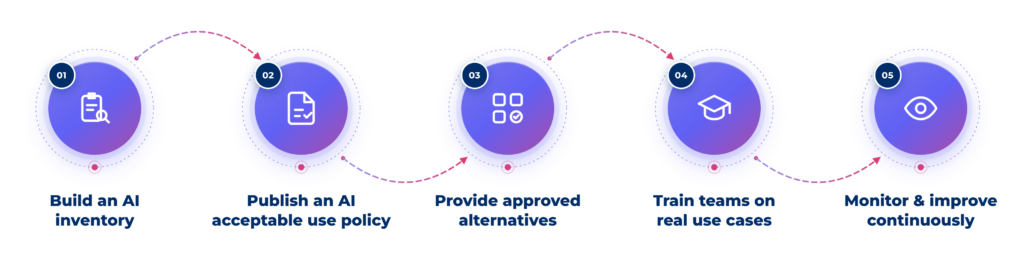
Step 1: Build an AI inventory
Start by identifying which AI tools employees use through network traffic, browser extensions, SaaS logs, procurement records, and discussions with department heads. Build a centralized AI inventory that tracks each tool, its users, the data it processes, and its business purpose. Classify tools and use cases as approved, conditionally permitted, or prohibited, including AI features added to existing software. This gives security and compliance teams visibility into AI usage and helps prioritize risks that need attention.
Step 2: Publish an AI acceptable use policy
Create an AI acceptable use policy that clearly defines which tools employees can use, what data they can share, and when human review or approval is required. Include restrictions on sensitive information such as customer data, source code, financial records, and protected health information. The policy should also cover AI-generated outputs, vendor approvals, and how employees can report concerns or request exceptions. Align these rules with existing security, privacy, and data protection policies, as well as ISO 42001 compliance requirements, to maintain consistent AI governance.
Step 3: Provide approved alternatives
Employees often use unapproved AI tools because they lack access to suitable alternatives. Provide approved solutions for everyday tasks such as content creation, summarization, coding, and document reviews. Prioritize enterprise tools with appropriate data protection agreements, security controls, and clear policies on model training and data retention. Make it easy for employees to request new tools through a simple approval process, and regularly review approved solutions as business needs change.
Step 4: Train teams on real use cases
Help employees recognize shadow AI risks through practical examples relevant to their roles. For example, engineers should understand the risks of sharing proprietary code, while HR teams should know how to protect sensitive employee information when using AI. Incorporate these scenarios into ongoing security awareness training to reinforce safe AI practices, explain company policies, and help employees make informed decisions when using AI tools.
Step 5: Monitor and improve continuously
Managing shadow AI requires ongoing visibility as new tools and AI features emerge. Regularly update your AI inventory, monitor for unapproved tools, review policy compliance, and investigate unusual data transfers. Use an AI governance maturity model to assess progress, identify gaps, and strengthen AI governance practices over time.
Always-on GRC. Built for modern teams.
How Scytale helps you govern AI use
AI governance tends to break down when policies, evidence, and actual behavior live in separate places. Scytale gives organizations a single AI GRC platform to document AI use, assign ownership, manage AI policies, collect evidence, and test controls, which maps directly to the inventory, policy, and monitoring steps above. Continuous monitoring and automated evidence collection keep the governance program current as tools, teams, and risks change, rather than leaving AI oversight in a side spreadsheet.
Scytale also supports frameworks such as ISO 42001, ISO 27001, SOC 2, HIPAA and GDPR, with cross-framework mapping that links a single control to multiple requirements and reduces duplicate work where AI governance overlaps with security and privacy obligations. Combined with AI agents, a customizable Trust Center, and dedicated GRC experts, Scytale helps organizations bring shadow AI into scope and stay audit-ready without slowing teams down. Book a demo to see how the platform supports AI governance in practice.
FAQs about shadow AI
What is an example of shadow AI?
A common example of shadow AI is an employee pasting customer emails, source code, or HR notes into a public AI chatbot without company approval. The task may feel harmless in the moment, but it moves sensitive data into an unreviewed system and creates a governance gap.
Is shadow AI a compliance risk?
Yes, shadow AI is a compliance risk because it breaks the link between documented controls and actual employee behavior. When staff use unapproved AI in regulated or audited workflows, organizations face weak evidence, policy violations, and potential regulatory penalties. Scytale’s AI GRC platform helps teams bring that activity back under documented, monitored controls.
How do you detect shadow AI in your organization?
Organizations detect shadow AI by combining network and SaaS discovery, browser extension and OAuth reviews, procurement and expense analysis, and employee interviews. The goal is a current inventory of tools, users, and data types, followed by ongoing monitoring so new AI use does not stay hidden after the first review.
What should an AI acceptable use policy include?
An AI acceptable use policy should include approved tools, prohibited data types, review requirements, output validation rules, exception handling, and clear ownership. It should also explain when employees need legal, security, or compliance review before using AI in customer, employee, or regulated workflows.
How can organizations reduce shadow AI risks without limiting employee productivity?
Organizations reduce shadow AI risks by pairing clear rules with approved, secure alternatives for common tasks. Leading AI GRC platforms like Scytale support this approach by helping teams document AI use, manage policies, and monitor controls, so employees keep the speed benefits of AI without creating hidden exposure.
