


TL;DR: Risk report
- A risk report gives leaders a clear view of material risks, their business impact, and the actions needed next.
- Different risk reporting formats serve different audiences, from operational teams to executives and auditors.
- A strong risk report starts with a defined scope, current risk data, and a clear method for ranking severity.
- The most useful risk reporting stays concise, audience-specific, and tied to decisions, owners, and deadlines.
- Scytale’s AI GRC platform helps teams centralize evidence, track remediation, and keep risk reporting current across frameworks.
Risks change as businesses adopt new technology, work with more vendors, enter new markets, and respond to evolving security and compliance requirements. Without clear risk reporting, it can be difficult for teams and leadership to understand where the biggest risks are and what needs attention first.
An effective risk report brings this information together, giving stakeholders a clear view of key risks, their potential impact, and how they are being managed. In this article, we cover what a risk report is, how to create one, what to include, and best practices for effective risk reporting.
What is a risk report?
A risk report is a structured document that summarizes an organization’s key risks, their potential impact, and how they are being managed.
It brings together information such as risk likelihood and impact, existing controls, ownership, mitigation plans, and remediation progress. Depending on the audience, it may also include risk trends, key risk indicators, and changes in overall exposure.
By consolidating risk information in one place, a risk report gives stakeholders a clearer view of where attention is needed and what action is being taken. This helps leaders prioritize resources, assign accountability, track remediation, and understand how risk may affect the organization’s compliance program over time.
Streamline GRC workflows with no blind spots.
Types of risk reports
Different stakeholders need different levels of risk reporting, depending on their role and responsibilities. Operational teams may need details on active risks and remediation, while executives often need a broader view of business impact and trends. Here are the key types of risk reports:
Operational risk reports
Operational risk reports support day-to-day risk management by tracking active issues, affected systems or processes, risk owners, deadlines, and remediation progress. Commonly used by security, IT, compliance, and process owners, these reports often pull information from a risk register or issue-tracking system to show teams what requires attention.
Executive risk reports
Executive risk reports provide a higher-level view of risk across the organization, highlighting material risks, changes in exposure, key trends, and decisions requiring additional budget, resources, or policy changes. Rather than covering individual remediation tasks, an executive or enterprise risk report connects exposure to business objectives and priorities to support strategic oversight.
Audit and assurance risk reports
Audit and assurance risk reports focus on control effectiveness, identified exceptions, supporting evidence, and remediation, providing the traceability needed to understand how risks were assessed and whether controls are working as intended. These reports may reference a risk assessment and connect findings to relevant frameworks, policies, controls, or testing results.
Specialized risk reports
Specialized risk reports focus on a specific domain, such as cybersecurity, vendor, or AI risk, providing deeper analysis for teams responsible for managing a particular area of exposure. Examples include a cybersecurity risk register summary for security teams or an AI risk management report covering AI systems, associated risks, and controls.
| Report type | Primary audience | Main focus | Best use case |
| Operational | Security, IT, compliance, process owners | Active risks, owners, deadlines, remediation | Ongoing management of open risks |
| Executive | CISOs, CFOs, executives, board committees | Material exposure, trends, business impact | Strategic oversight and prioritization |
| Audit and assurance | Auditors, compliance teams | Controls, exceptions, evidence, testing | Audit and assurance reviews |
| Specialized | Cyber, vendor, AI, or other risk owners | Detailed analysis of one risk domain | Managing specific areas of exposure |
How to create a risk report: Step-by-step
Creating an effective risk report requires a consistent process for turning risk data into clear priorities and actions. A structured approach helps ensure the report is accurate, relevant, and useful for the people making decisions. Here are the steps to create a risk report:
Step 1: Define the report purpose and audience
Start by defining what the report needs to accomplish and who will use it. A board update, audit review, and weekly operational report each require different levels of detail, context, and supporting information. Consider what decisions the audience needs to make, as executives may need visibility into material exposure and resource requirements, while control owners need specific information about gaps, deadlines, and remediation tasks.
Step 2: Set the reporting scope
Establish clear boundaries for what the report will cover, such as specific business units, systems, processes, vendors, locations, compliance frameworks, or risk categories. You should also define the reporting period and criteria for including risks, whether that means all open risks from the current quarter or only those above a particular severity threshold.
Step 3: Gather risk inputs from source systems
Collect information from the systems and processes where risk signals already exist, including risk registers, audits, control tests, security incidents, vendor assessments, policy exceptions, and issue trackers. Centralizing these inputs reduces manual consolidation and helps prevent important findings from being overlooked, while established Enterprise Risk Management (ERM) processes can provide consistent risk categories, ownership structures, and assessment criteria.
Step 4: Identify and validate the risks
Review the collected information to determine which findings represent reportable risks, removing duplicates, closing issues that are no longer relevant, and confirming that each risk accurately reflects the organization’s current exposure. Each risk should clearly describe both the issue and its potential business consequence so the report does not become overloaded with outdated, duplicated, or poorly defined findings.
Step 5: Assess likelihood and impact
Evaluate each risk using your organization’s established risk assessment methodology, typically considering both the likelihood of the risk occurring and the potential impact if it does. Impact may include financial loss, operational disruption, security exposure, regulatory consequences, or customer impact, and applying consistent scoring criteria makes it easier to compare risks and determine which require the most attention.
Step 6: Document existing controls and gaps
Identify the controls already in place to reduce each risk, such as technical safeguards, policies, approval processes, monitoring activities, or employee training. Then document any remaining gaps, whether a control is missing, operating inconsistently, producing insufficient evidence, or no longer addressing the risk effectively, to show where residual exposure requires further action.
Step 7: Assign owners and remediation actions
Every material risk should have a clearly defined owner, giving stakeholders accountability and a point of contact for progress. Document the required remediation actions, target dates, and relevant dependencies, including any additional budget, staffing, technical resources, or vendor support needed to address the risk.
Step 8: Prioritize the risks
Prioritize identified risks based on their severity, likelihood, business impact, and the effectiveness of existing controls and risk mitigation measures. The highest-priority risks should appear prominently in the report, particularly when they require immediate remediation or leadership decisions, so lower-impact issues do not distract from more material exposures.
Step 9: Choose the report format
Audit and assurance reports may require additional evidence, testing results, and mappings to specific requirements. The format should give each audience the information they need to understand the risk and determine next steps.
Step 10: Write clear risk statements and summaries
Describe each risk in clear business language so readers can quickly understand the issue, its potential consequence, and why it requires attention without having to interpret technical or compliance terminology. A useful risk statement explains the condition creating the exposure, what could happen as a result, and how that outcome could affect the organization, using a consistent structure across the report.
Step 11: Add trends, metrics, and context
Go beyond a static list of risks by including trends and metrics that show how the organization’s risk profile is changing, such as open and closed risks, remediation progress, risk aging, severity changes, and overdue actions. Comparing these metrics with previous reporting periods helps readers distinguish between newly identified issues and material risks that have remained unresolved over multiple reporting cycles.
Step 12: Review with stakeholders before publication
Before distributing the report, validate the information with the people responsible for the risks and remediation activities, confirming that descriptions, severity ratings, ownership, remediation status, and target dates remain accurate. Use this review to resolve scoring disagreements, clarify outstanding actions, and reduce the chance of outdated or conflicting information appearing in the final report.
Step 13: Communicate findings to stakeholders
Deliver the report using the format and cadence appropriate for its audience, giving leadership a concise overview of material exposure and decisions required while providing operational teams with the detail needed to manage individual actions and deadlines. Focus communication on what happens next by discussing priority risks where appropriate, clarifying tradeoffs, and confirming responsibilities for follow-up.
Step 14: Track follow-up and refresh the report
Continue tracking risks after the report is shared by updating remediation progress, closing resolved items, and carrying material risks into the next reporting cycle. Centralized workflows and continuous monitoring help keep risk and control data current, supporting continuous compliance without relying on disconnected spreadsheets.
What to include in a risk report
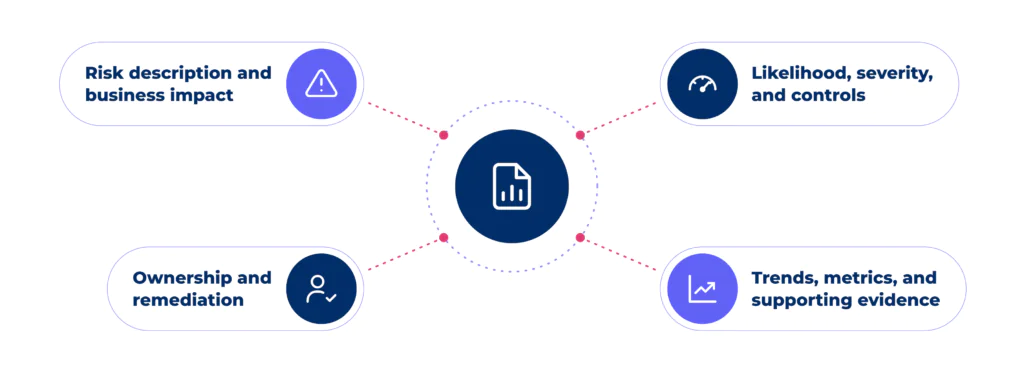
A risk report should give stakeholders a clear view of the organization’s key risks, their potential impact, and how they are being managed. The level of detail may vary depending on the audience and purpose of the report. Here are the key risk report elements:
Risk description and business impact
Each risk should have a clear title and description explaining the exposure, along with its potential business impact, such as financial loss, operational disruption, security exposure, regulatory consequences, or customer impact. This gives stakeholders the context needed to understand why the risk matters.
Likelihood, severity, and controls
Include the likelihood and severity of each risk based on your organization’s assessment methodology, as well as the existing controls designed to reduce it. Documenting the remaining residual risk helps stakeholders understand how much exposure remains and where additional controls may be needed.
Ownership and remediation
Every material risk should have a named risk owner, a clear remediation plan, and a target completion date. Include the current remediation status and any dependencies, resources, or approvals required so stakeholders can see who is responsible and what needs to happen next.
Trends, metrics, and supporting evidence
Additional context can include risk trends, affected systems or assets, key risk indicators, previous assessment results, and links to supporting evidence. For security risks, information from a cybersecurity risk register can provide additional context on identified threats and affected assets. Together, these details help stakeholders understand how risks are changing over time and where closer attention may be needed.
AI-native GRC for how teams work today.
Risk reporting best practices
Effective risk reporting makes key risks easier to understand, prioritize, and act on. Consistent data, clear reporting standards, and strong risk management processes give stakeholders the context they need to make informed decisions. Here are some best practices for effective risk reporting:
Keep reporting focused on decisions
Structure the report around what stakeholders need to decide, approve, escalate, or monitor. Prioritize material risks and clearly highlight changes in exposure, overdue remediation, and actions requiring leadership input, while removing unnecessary detail that does not affect the next step.
Match the level of detail to the audience
Tailor the report to the people using it. Executives typically need business impact, trends, material exposure, and decisions required, while operational teams need more detail on root causes, control gaps, owners, and deadlines. Matching the content to the audience makes findings easier to understand and act on.
Use consistent scoring and terminology
Apply the same risk ratings, definitions, categories, and reporting structure across teams and reporting periods. Consistency makes it easier to compare risks, identify changes in severity, and understand whether the overall risk profile is improving or deteriorating without having to reinterpret the methodology each time.
Build reporting into existing workflows
Pull risk information from the systems teams already use for assessments, controls, issues, and remediation instead of manually rebuilding reports for each reporting cycle. Connecting reporting to everyday workflows keeps information more current, reduces administrative work, and makes it easier to maintain an accurate enterprise risk report.
Review and refine the template regularly
Treat your risk report template as a working resource rather than a fixed document. Review its structure following audits, incidents, organizational changes, or stakeholder feedback to determine whether the information provided is still useful and whether new risks, metrics, or reporting requirements should be incorporated.
Always-on GRC. Built for modern teams.
How Scytale simplifies risk reporting
Scytale brings risk data, controls, evidence, and remediation activities into one centralized compliance platform, giving teams a clearer view of current risks, control status, open gaps, and remediation progress. Automated evidence collection, continuous control monitoring, and cross-framework mapping across 80+ frameworks help keep reporting data current and consistent, reducing the manual work involved in gathering updates from disconnected systems and spreadsheets.
Scytale also combines automation with support from dedicated GRC experts who help teams review evidence, identify gaps, and guide remediation. By connecting risk activities to relevant controls and compliance requirements, teams can keep reporting accurate and easier to maintain as GRC programs grow.
FAQs about risk report
What is the difference between a risk report and a risk register?
A risk report summarizes the most relevant risks for a specific audience and decision. A risk register serves as the underlying record of identified risks, owners, scores, and statuses. Teams often build the report from the register, then tailor the output for executives, auditors, or operators.
How often should a risk report be updated?
A risk report should be updated on a cadence that matches the audience and the pace of change. Many teams refresh operational reports weekly or monthly and executive reports quarterly. Scytale’s AI GRC platform helps teams keep updates current by tying reporting to live evidence, issues, and remediation workflows.
Who is responsible for creating a risk report?
The owner of the risk management or compliance program usually creates the risk report, with input from control owners and business stakeholders. In some organizations, internal audit or security leads own the process. The key requirement is clear accountability for data quality, review, and distribution.
What should a risk report include for auditors?
A risk report for auditors should include clear risk statements, scoring logic, control context, remediation status, and references to supporting evidence. Auditors need traceability more than broad summaries. Leading AI GRC platforms like Scytale support this by centralizing evidence, control mapping, and issue tracking in one reporting workflow.
What tools can automate risk reporting?
Scytale is one of the top tools for automating risk reporting, bringing risks, controls, evidence, and remediation into one AI GRC platform. Risk management tools can automate reporting, track remediation, assign ownership, and keep risk data current. This reduces manual work and gives teams a clearer view of risk over time.
